
Conversion tracking in Telegram Ads campaigns
Conversion tracking for links within Telegram in Telegram Ads campaigns
AdsGram macros are not supported for links leading to destinations within Telegram in Telegram Ads campaigns and are not passed through to these advertising links. Therefore, the conversion confirmation API cannot be used to track conversions from links leading to Telegram Mini Apps (TMA), bots, or channels.
For links within Telegram in Telegram Ads campaigns, the following target events are automatically reported as Goal 1 by default:
- TMA — TMA launch;
- Bots — bot launch;
- Channels — channel subscription.
Conversions are reported automatically, so no additional configuration is required.
Setting up conversion postbacks for web links in Telegram Ads
Parameters:
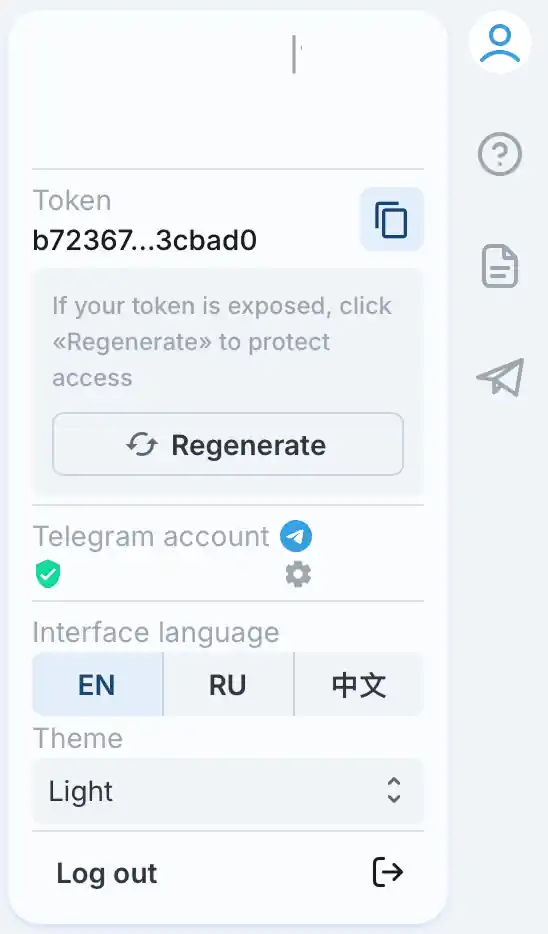
token— a unique token associated with your account. It is available in the AdsGram dashboard and can be regenerated if necessary.How to get your token:
- Open the AdsGram dashboard.
- Click your profile in the top-right corner.
- Find the
tokenparameter and click the copy button to copy it.
campaignid— the ID of the AdsGram advertising campaign. It corresponds to the value of the{campaign_id}macro passed in the tracking link. AdsGram inserts the macro value when a user clicks the link.goaltype— a parameter that specifies the type of conversion (funnel stage), helping to segment various user actions. It accepts integer values from 1 to 3.goaltype usage:
- Define the funnel stages in your product or service.
- Map the stages to goaltype values:
- Registration
- First deposit/purchase
- Repeat deposit/purchase
- Configure conversion tracking for the relevant stages of the user journey.
- Add the goaltype parameter to your API request when sending conversion data.
- Use this parameter in your analytics to perform a detailed performance analysis by conversion type.
How to set up conversion tracking:
- Select a Telegram Ads campaign. Use an existing active campaign or create a new one.
- Configure the tracking link. Make sure it contains the
{campaign_id}macro. - Get your token. Copy your unique token from the AdsGram dashboard.
- Set up postback delivery. Configure your server to send an API request to AdsGram whenever a user completes a target action.
- Specify the conversion type. Set the appropriate
goaltypevalue if you want to distinguish between funnel stages. - Test the integration. Follow the steps in the Integration testing section below and verify that conversions appear in AdsGram statistics.
Example of API request upon conversion:
GET
https://api.adsgram.ai/confirm_conversion?token=YOUR_UNIQUE_TOKEN&campaignid=72156&goaltype=2
In this example, goaltype=2 represents a conversion such as a first deposit or purchase.
Replace YOUR_UNIQUE_TOKEN with your account token and 72156 with your advertising campaign ID.
Expected response: 200 OK — the conversion has been successfully registered.
Integration testing
To test conversion tracking, follow these steps:
- Create or select a campaign. Create or select a Telegram Ads campaign and configure the tracking link according to the documentation. Make sure the
{campaign_id}macro is included in the link. - Wait for clicks. Wait until users have clicked the tracking link several times.
- Send a test postback manually with the
goaltype=1parameter. Use a validtokenand the ID of the test campaign in thecampaignidparameter. - Check the result. Verify that the request was processed successfully and that the conversion appears in AdsGram statistics for the selected campaign.
Troubleshooting
- The conversion appears in statistics: the integration is configured correctly and working for the tested scenario.
- The server returns an error: check the request URL and the values of the
token,campaignid, andgoaltypeparameters. - The request succeeds, but the conversion does not appear: statistics are updated once per hour. If the conversion is still missing after one hour, contact AdsGram Support or your account manager. Be sure to include the request and response logs in your support request.